Case Study

How We Built LumaTake, a Privacy-First Video Studio for Mac

Client

LumaTake

Timeline

Founder-led product development

Product

Native macOS video production application

Industry

Creator ToolsApple PlatformsMedia Production

Scope of Work

Product StrategyNative macOS EngineeringProduct DesignOn-Device AI

Challenge

Screen recording, editing, captioning, audio cleanup, and social export are often split across multiple tools or routed through cloud services. LumaTake needed to bring that workflow into one native Mac application while keeping source media local, supporting demanding video operations, and making a deep production toolkit approachable for everyday creators.

Solutions

Check Icon

Designed and engineered a native macOS workflow for screen, window, region, camera, and social-format recording.

Check Icon

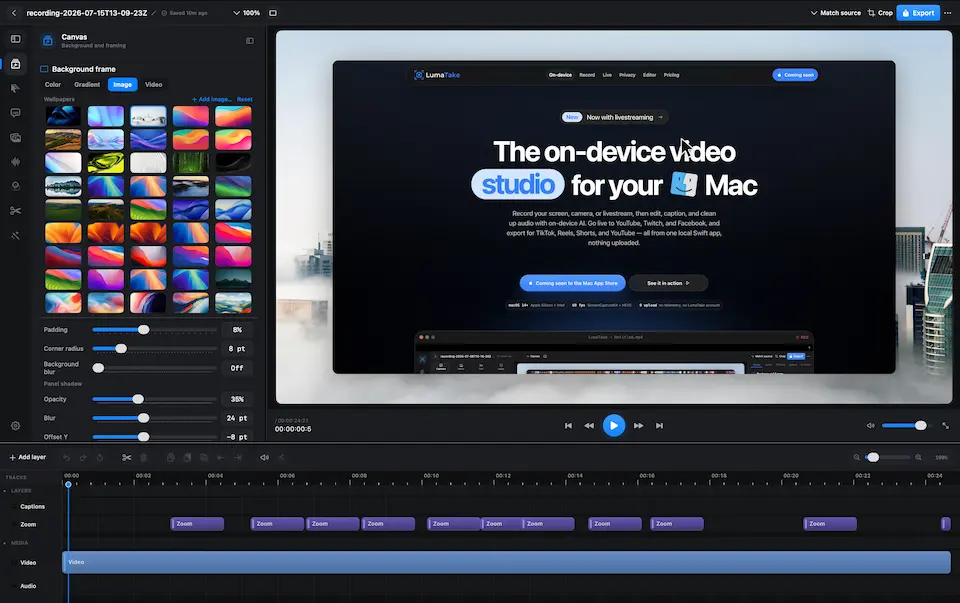
Built a timeline-based editor with automatic zooms, cursor effects, captions, background framing, media layers, effects, LUTs, and camera controls.

Check Icon

Integrated on-device transcription and AI-assisted silence, filler-word, and background-noise removal so sensitive media does not need to leave the Mac.

Check Icon

Created export paths for landscape, portrait, and square content so one recording can move directly into YouTube, TikTok, Reels, and Shorts workflows.

What the product delivers

Check Icon

Recording, editing, captioning, audio cleanup, and export in one native Mac production environment.

Check Icon

Privacy-conscious local processing with no required media upload or LumaTake account.

Check Icon

A sophisticated Apple-platform product delivered from product strategy and interaction design through native implementation.

LumaTake product interface