Production AI, software, and automation—under one roof.
We design and build practical systems around your operational bottlenecks, customer experience, and growth goals.
The Search Console clues, server-side diagnosis, safe fix, and early recovery

A Bluehost firewall returned 403 errors to Googlebot while the site still worked for visitors. See the evidence, diagnosis, narrow fix, and early recovery.
One of the websites we manage was heading towards its best month in Google Search. Then, within a week, daily clicks fell from roughly 45 to two.
The website was still online. Its pages loaded normally for visitors, and there had been no obvious collapse in its sitewide average position. The problem was happening somewhere most visitors would never see it: the server was returning a 403 response to Googlebot.
This is how we found the block, what Bluehost discovered in its firewall logs, and how to check your own site without jumping to the wrong conclusion.
Freshly Folded is a laundry pickup and delivery company serving the San Diego area. During the spring and early summer of 2026, its organic search traffic was climbing consistently.
Google Search Console recorded a new rolling 28-day click milestone almost every week:
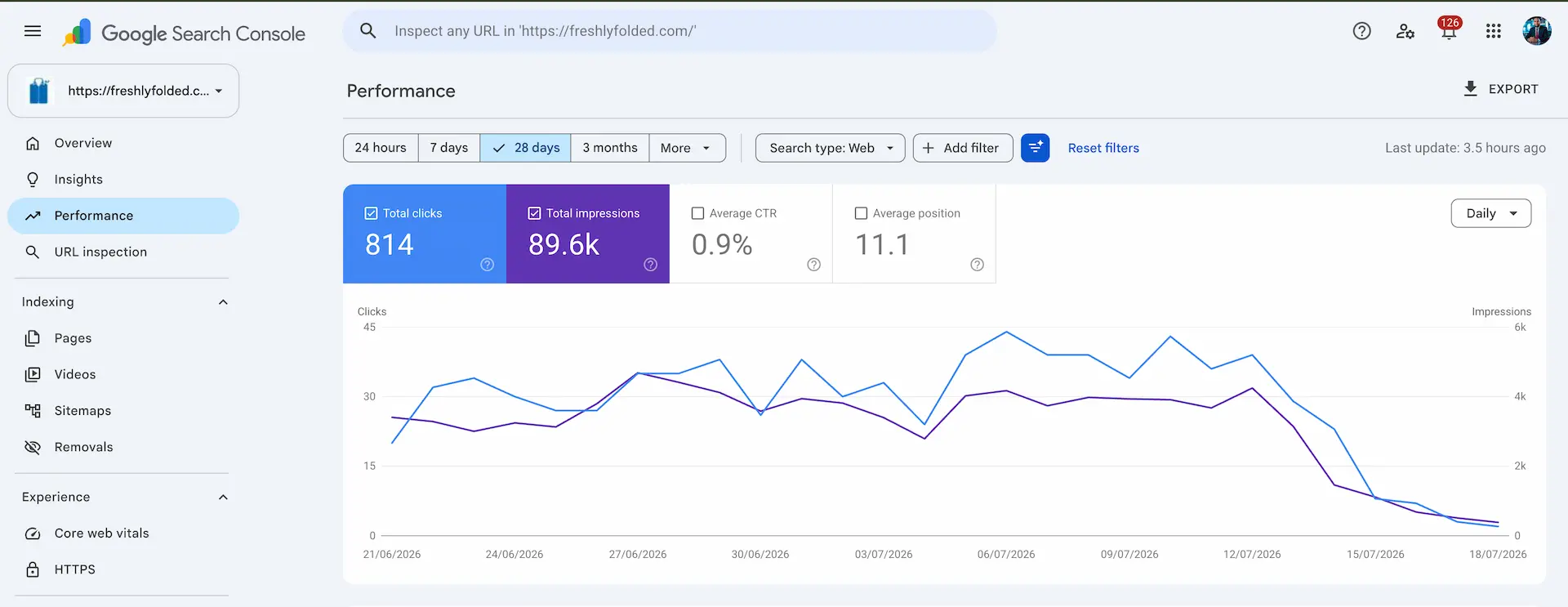
At that rate, reaching 1,000 clicks looked realistic. Instead, the trend reversed. Daily clicks fell from the mid-40s to about two by July 18, and the rolling 28-day total had dropped to 767 by July 24.
Because that total covers the previous 28 days, it does not fall all at once. Each strong day that leaves the reporting window is replaced by a much weaker one. That is why a site can continue losing ground in the rolling total even after the underlying problem has been fixed.

By July 18, Freshly Folded's clicks and impressions had fallen close to zero while its 28-day average position was still 11.1.
When search traffic falls sharply, it is natural to suspect a Google update, a manual action, or a major ranking loss. We checked those possibilities, but one detail did not fit that explanation.
The site's average position was 10.9 on July 22 and 11.0 on July 24. That small change did not look like a sitewide ranking collapse, even though clicks and impressions had fallen heavily.
Average position needs to be handled carefully. It is an aggregate based on the queries and pages that still receive impressions. If some pages disappear from search entirely, the remaining pages can keep the average looking stable. A steady average position therefore does not prove that rankings are unchanged.
In this case, it was simply a useful clue. The combination of collapsing impressions, collapsing clicks, and a broadly stable average position made us look beyond rankings and investigate whether Google could still access the pages.
Google recommends examining clicks, impressions, affected pages, affected queries, seasonality, technical issues, and ranking changes together when debugging a Search traffic drop.
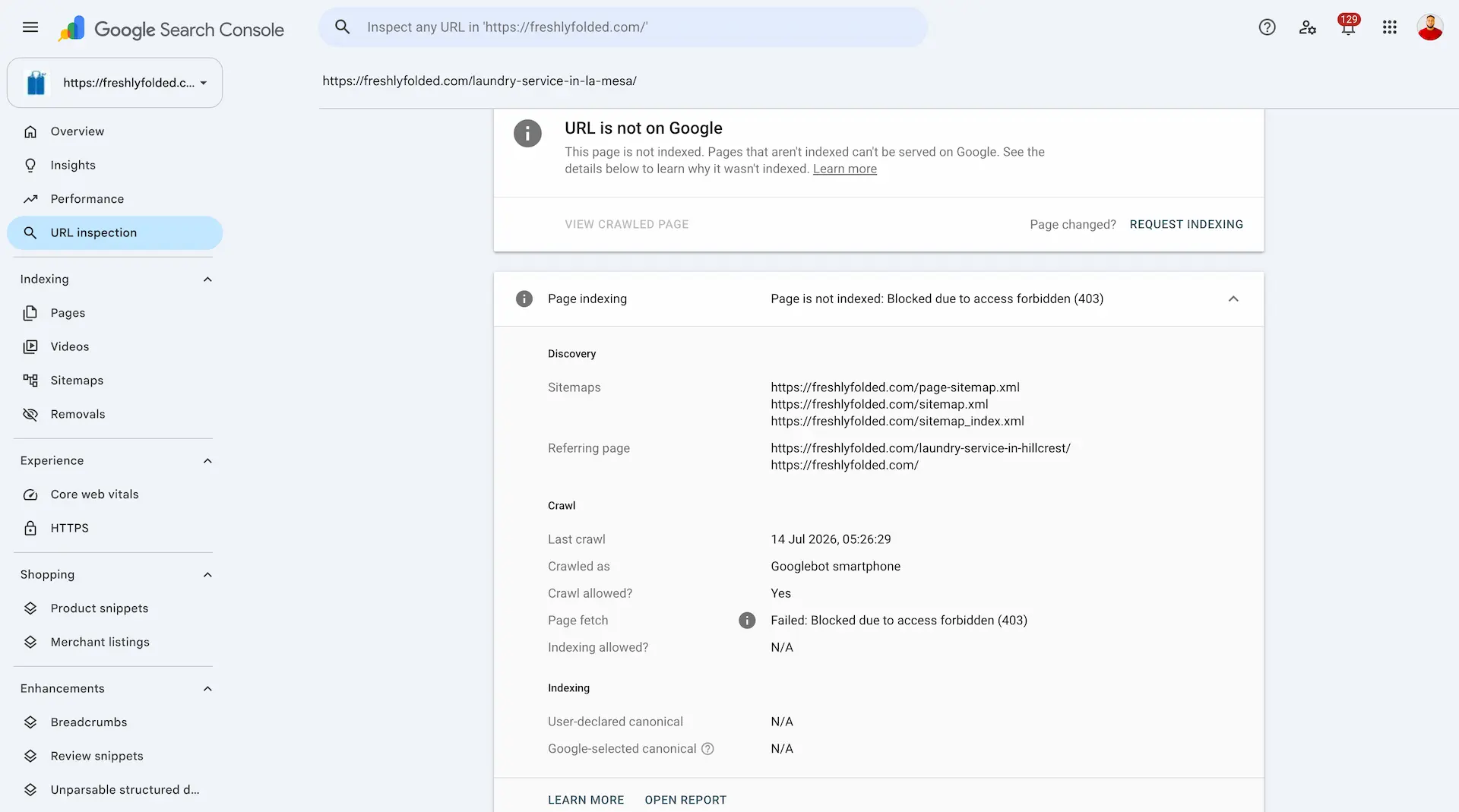
We inspected several important pages in Google Search Console. Affected URLs returned the same message:
Page is not indexed: Blocked due to access forbidden (403)
The report also showed that Google's most recent attempt to fetch the page had failed.
A 403 response means the server understood the request but refused to serve the requested resource. Google's documentation is clear about the consequence: content returned with a 4xx status is not used, and URLs that continue returning a 4xx response can be removed from the index over time. You can read Google's explanation of how HTTP status codes affect crawling and indexing.
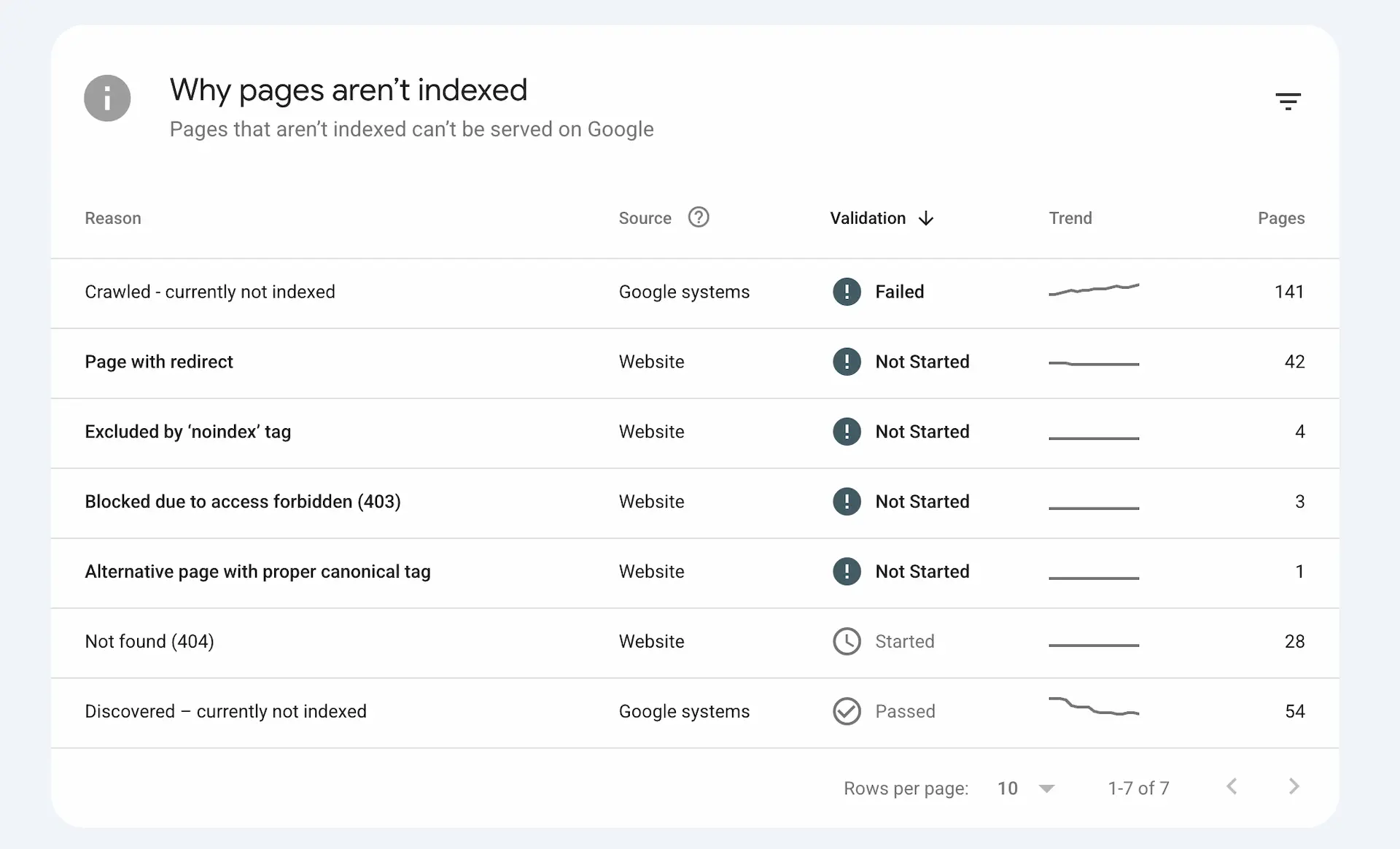
The site's Page indexing report also showed more than 200 non-indexed URLs across several categories. In this incident, those categories were misleading: our investigation found that the URLs had been affected by the same 403 error even when Search Console categorized them differently. The decisive evidence was the 403 result on affected pages, followed by confirmation in the host's firewall logs.
One detail matters here: the standard URL Inspection result reflects Google's recorded information from its last crawl. After making a change, use Test Live URL to check whether Google can access the page now.

The Page indexing report listed three URLs under “Blocked due to access forbidden (403)” alongside other excluded-page categories, which were also categorized wrongly, as they were all affected by the same 403 error.

URL Inspection showed that Googlebot's July 14 crawl of a Freshly Folded location page failed with a 403 response.
Freshly Folded is hosted by Bluehost. We gave its support team affected URLs, the dates of the failed crawls, and screenshots from Search Console. According to Bluehost support, a web application firewall rule had produced a false positive.
Bluehost support identified rule 900934 as the source of the block. The affected URLs covered a broad mix of page types and were predominantly non-location pages, so it would be inaccurate to attribute the incident to location pages or long neighborhood lists. What the server-side evidence established was that the rule was returning 403 responses to legitimate Googlebot requests across the site.
Web application firewalls are designed to stop malicious requests before they reach a website. ModSecurity, for example, is a widely used open-source web application firewall engine. Like any rules-based security layer, a WAF can occasionally block legitimate traffic.
This does not mean every Googlebot 403 is a Bluehost or ModSecurity problem. A 403 can also come from:
.htaccess or server configurationThe 403 tells you that access was refused. The relevant firewall, CDN, application, and server logs tell you why.
The affected pages continued to work in an ordinary browser. There was no broken layout, outage page, or customer-facing error. The block was conditional, so a normal visit did not reproduce what Googlebot encountered.
That is why checking the website manually was not enough. Search Console showed the failed crawl, while Bluehost's logs identified the rule responsible for it.
The timing also made the decline look, at first glance, like an SEO or algorithm problem. It began just after the site reached a new search milestone. Without the 403 evidence, it would have been easy to spend days rewriting content or changing pages that were not the source of the problem.
Open Performance and compare clicks, impressions, CTR, and average position over the same period. Then review the Pages, Queries, Countries, and Devices tabs to see whether the decline is sitewide or limited to part of the site.
Falling clicks with steady average position is not a diagnosis. Treat it as a reason to investigate access, indexing, demand, and reporting issues alongside ranking changes.
Do not test only the homepage. Inspect:
If Search Console reports a failed fetch or “Blocked due to access forbidden (403),” record the affected URL and the last crawl time.
Use Test Live URL in Search Console. This distinguishes a historical crawl failure from a block that is still active.
A normal browser test or a command-line request can help with initial troubleshooting, but neither perfectly reproduces Google's crawl. A request that merely uses “Googlebot” as its user agent can be spoofed, and some firewalls make decisions based on IP address, behavior, or several signals together.
Look for a rise in:
Match the “first detected” or crawl dates against the date impressions began falling. Remember that the last two categories do not, by themselves, prove a firewall problem.
Give your host or developer:
Ask them to check the WAF, CDN, security plugin, web server, and origin logs. Request the exact rule ID, the request IP, the user agent, and the reason the request was denied.
Before permanently allowing a crawler, verify that the requests are genuinely from Google. Google documents both DNS verification and its published IP ranges in its guide to verifying requests from Google crawlers.
Save the affected URLs, timestamps, rule ID, screenshots, and relevant log entries before changing anything. This makes it easier to confirm that the same issue has been resolved and to diagnose it if it returns.
Ask the host to exclude the confirmed false positive for the affected domain, path, parameter, or verified Google crawler traffic, depending on what the logs show.
Do not disable the entire firewall unless there is no safer temporary option. Do not blindly allow every request with “Googlebot” in its user agent, because anyone can send that label. The goal is to stop the false positive while keeping the site's other protections in place.
In this case, Bluehost excluded the rule that its logs had identified as the source of the block.
Run Test Live URL again on several affected pages. Confirm that the live test succeeds and that the page can be fetched. Test different page types rather than assuming that a fix for one URL covers the whole site.
Use Request Indexing for a small number of priority URLs. If the Page indexing report provides a Validate Fix option for the affected issue, start validation after confirming that representative pages pass the live test.
For a larger set of pages, make sure the XML sitemap is current, contains the canonical URLs you want indexed, and is accessible to Google. Submitting a sitemap is a discovery signal, not a guarantee of immediate crawling or indexing. Google says recrawling can take from a few days to a few weeks, and repeated indexing requests do not make the process faster.
Watch:
One strong day is encouraging, but it is not enough to declare a complete recovery.
After Bluehost excluded the identified rule, the affected pages passed the access checks we repeated. Search performance also showed an early improvement.
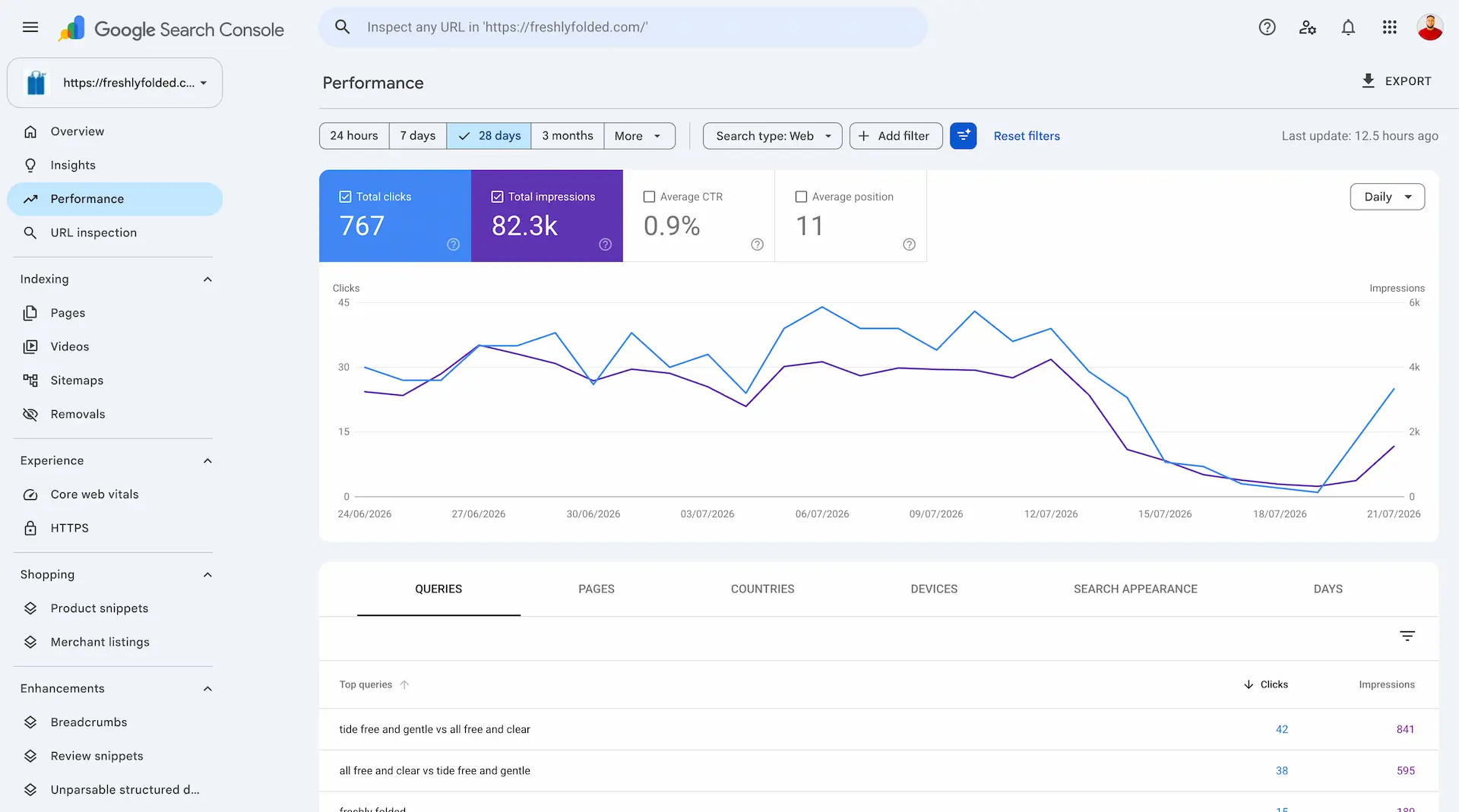
On July 21, the site recorded 25 clicks and more than 1,500 impressions after both metrics had fallen close to zero. That rebound was a good sign, but we treated it as the beginning of recovery rather than proof that every page had returned.
The rolling 28-day click total was still down to 767 on July 24. That was expected. The weak days were still inside the reporting window, and Google still had pages to recrawl and reassess.
The practical lesson is simple: when search traffic drops sharply, do not assume the answer is content or rankings. Check whether Google can fetch the pages before changing the pages themselves. A website can look completely healthy to customers while a firewall is returning a very different response to a crawler.

Search performance began to rebound on July 21, but the rolling 28-day total still reflected the earlier loss.
No. Average position is an aggregate based on impressions that still occurred. It can remain stable even when some pages or queries lose visibility completely. Use it as one diagnostic clue alongside page-level impressions, queries, indexing reports, crawl results, and server logs.
No. It means the server or an intermediate security layer refused Google's request. The source may be a WAF, CDN, security plugin, access rule, file permission, or server configuration. Logs are needed to identify the cause.
Security systems can treat requests differently based on IP address, user agent, location, request rate, cookies, headers, or behavior. Your browser may receive a normal 200 response while Googlebot receives a 403.
Only after confirming that the requests really come from Google. Prefer a narrow, rule-specific exception over disabling the firewall or trusting any request that claims to be Googlebot.
There is no fixed timetable. Important pages may be recrawled within days, while broader recovery can take several weeks or longer. The pace depends on crawl demand, the number of affected URLs, how long the block lasted, site quality, internal linking, and whether the pages remain eligible for indexing.
If search visibility has fallen and the cause is not obvious, explore our ongoing growth and SEO services, read the earlier Freshly Folded SEO case study, or contact Luminous Digital Visions.
We connect strategy to implementation across AI systems, software engineering, automation, and digital growth.